A real case study of migrating an AI-built site to WordPress after Lovable.dev and CloneWebX failed
If you built your website with an AI site builder like Lovable.dev, Bolt.new, v0 by Vercel, Framer AI, Webflow AI, or Wix ADI — and you’ve discovered you can’t actually edit or manage what it produced — this case study is for you.
One of my recent clients went through exactly that journey. He tried two AI-based approaches before asking me to rebuild his site properly. Here is what happened, why automated AI-to-WordPress conversion tools don’t solve the real problem, and how the final site was rebuilt on WordPress so he could finally manage his own content.
The finished rebuild is live at woodgraintales.co.il.
Why AI Website Builders Like Lovable.dev Get You 80% of the Way and No Further
My client was genuinely happy with his first experience on Lovable.dev. He described the creation process as enjoyable, and in his own words he got about 80% of the site he had in his head.
The remaining 20% is where every business owner I talk to runs into the same wall. AI site builders — Lovable, Bolt.new, v0, Framer AI, Wix ADI, 10Web AI Website Builder, Hostinger AI Website Builder — are excellent at generating a site. They are weak at letting you manage one.
Specifically, my client ran into the classic AI-built-site problems:
- The content isn’t sitting in a real CMS. It’s baked into components and code. There’s no friendly admin where a non-technical person can change a headline or swap an image.
- Every edit requires re-prompting the AI. Which means every edit risks breaking something else on the site.
- There’s no blog engine, no media library, no user roles, no plugin ecosystem. For a business site that needs to grow, that is a dead end.
- SEO and accessibility controls are minimal. What the AI ships is what you get.
- You don’t own the editing environment. You’re locked into the tool.
This is what I now refer to as the “AI site-builder trap,” and it’s becoming one of the most common reasons new AI victims contact me.
Why Automated AI-to-WordPress Conversion Services Don’t Actually Fix the Problem
Before reaching out to me, my client tried to escape the trap himself. He used an automated migration service called CloneWebX by Softlite, which promises to convert any existing website into WordPress + Elementor.
On paper, this sounds exactly right. Get out of the proprietary AI tool, land inside WordPress and Elementor, regain full editing control.
In practice, here is what actually happened — and why almost every AI-website-to-WordPress conversion service ends up in the same place:
- The parts of the page that mapped cleanly to standard Elementor widgets were imported as Elementor widgets. Those sections became editable. So far so good.
- The parts that didn’t map — custom AI-generated components, unusual layouts, anything non-standard — were dumped into a custom WordPress plugin generated specifically for his site. That plugin contained the original AI-generated HTML and a pile of embedded CSS overrides.
- Those sections were now invisible to Elementor. You couldn’t click them and edit them like normal content. To change a single word, someone had to open plugin files via FTP.
- The embedded CSS inside that plugin started fighting with Elementor’s own styles and the theme’s styles. The design drifted. Things that looked fine on the AI-generated original now looked broken.
So he ended up in the worst possible state: inside WordPress, but still unable to manage his own content, and now with a broken design on top of it. The core problem — AI-generated markup that wasn’t structured for human editing — simply got relocated from Lovable into a WordPress plugin.
This is the pattern with every automated AI-to-WordPress converter I have seen. They inherit the underlying problem instead of solving it.
How to Recreate an AI-Generated Website on WordPress the Right Way
When he reached out, we agreed the answer wasn’t another migration tool. It was a proper rebuild on WordPress — same visual direction, but on a foundation he could actually live with. The finished result: woodgraintales.co.il – a Hebrew website on wood working.
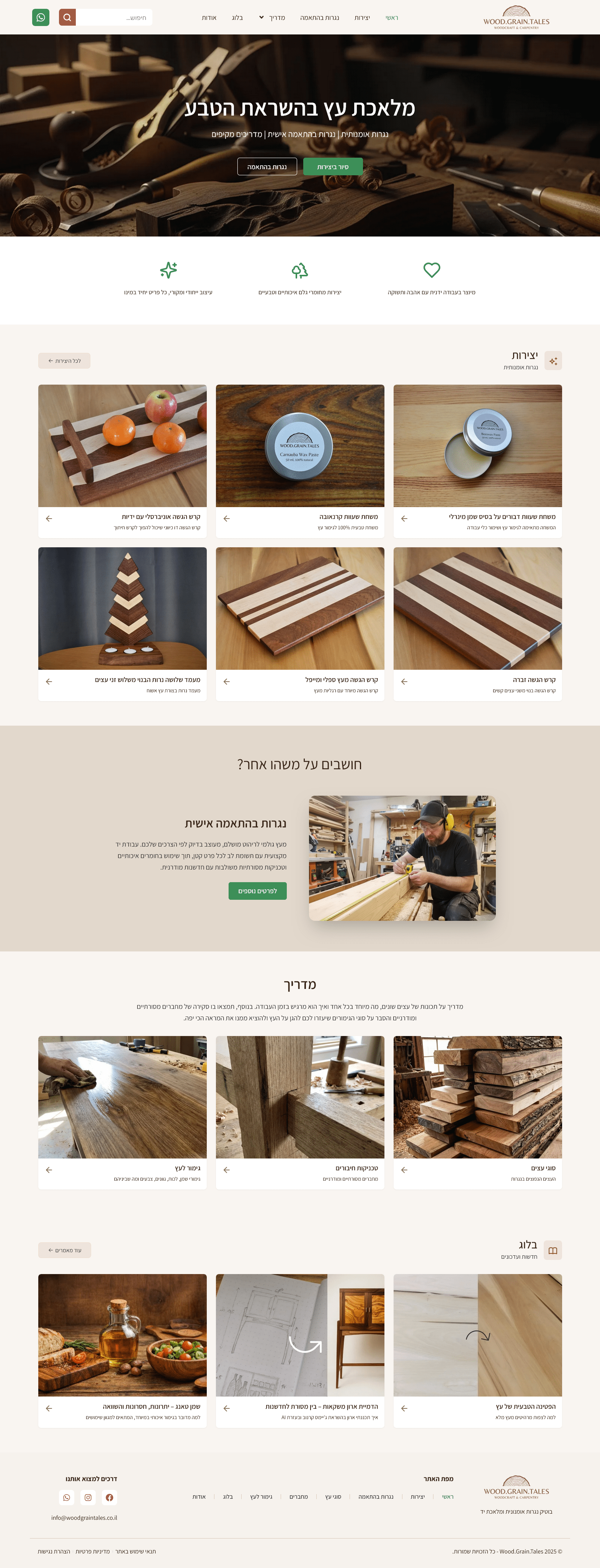
Here is what a proper rebuild of an AI-generated site looks like:
1. Rebuilding on the Existing WordPress Install, Not Starting Over
This wasn’t a fresh WordPress install. The site was already on WordPress at Hostinger with a simple Hello Elementor / Hello Biz default theme, so I worked with what was there instead of throwing it all away.
As usual, the first thing I did was add a proper child theme. This lets me make customizations safely and keeps them intact through future parent-theme updates.
The real work was methodical. The CloneWebX plugin itself is a closed package — you can’t pick code out of it, you can only disable the plugin as a whole. What you can control is what the page layout pulls from it. So I went through the site section by section, copying the look of each CloneWebX widget and recreating it properly inside Elementor as a native, editable component. Once a section was faithfully reconstructed in Elementor, I removed the corresponding CloneWebX element from the page layout. This went on piece by piece until nothing on any page still referenced the plugin’s widgets — at which point the CloneWebX plugin was disabled entirely.
Worth noting: this rebuild required an Elementor Pro license. The free version of Elementor doesn’t cover the widgets, theme builder features, and template controls needed to replace CloneWebX’s custom components properly.
The payoff: no mystery plugin, no imported HTML dumps, no collision CSS fighting the theme. Every headline, image, button, and section is now editable from the standard Elementor interface by the client himself. No developer needed for day-to-day updates. Content management stops being a bottleneck.
2. Elementor — Used Properly This Time (Client’s Choice, Not Mine)
A note on the page builder: I would not normally recommend Elementor for a new project. There are leaner, more standards-friendly options — the native WordPress block editor with a well-built FSE theme is almost always my first choice, and for sites needing custom blocks I prefer ACF Pro blocks. Elementor adds weight, locks you into its ecosystem, and produces markup that’s harder to maintain long-term.
In this case Elementor was already in place because that’s what CloneWebX had imported the site into, and the client had already started learning its interface. Rather than force another migration on him, we kept Elementor and used it the way it’s actually meant to be used — which is exactly what the CloneWebX version was missing.
3. Design Reconstructed, Not Copy-Pasted
The visual direction from the Lovable-generated original was preserved, but the CSS was rewritten cleanly against Elementor’s structure. No !important wars. No hidden styles buried in a plugin. The design looks like the AI promised, but behaves predictably. Also WordPress and its plugins are now completely updatable: one-time import plugin from CloneWebX was for sure breaking at some point in the future.
4. Performance Optimization to Near-100 PageSpeed Scores
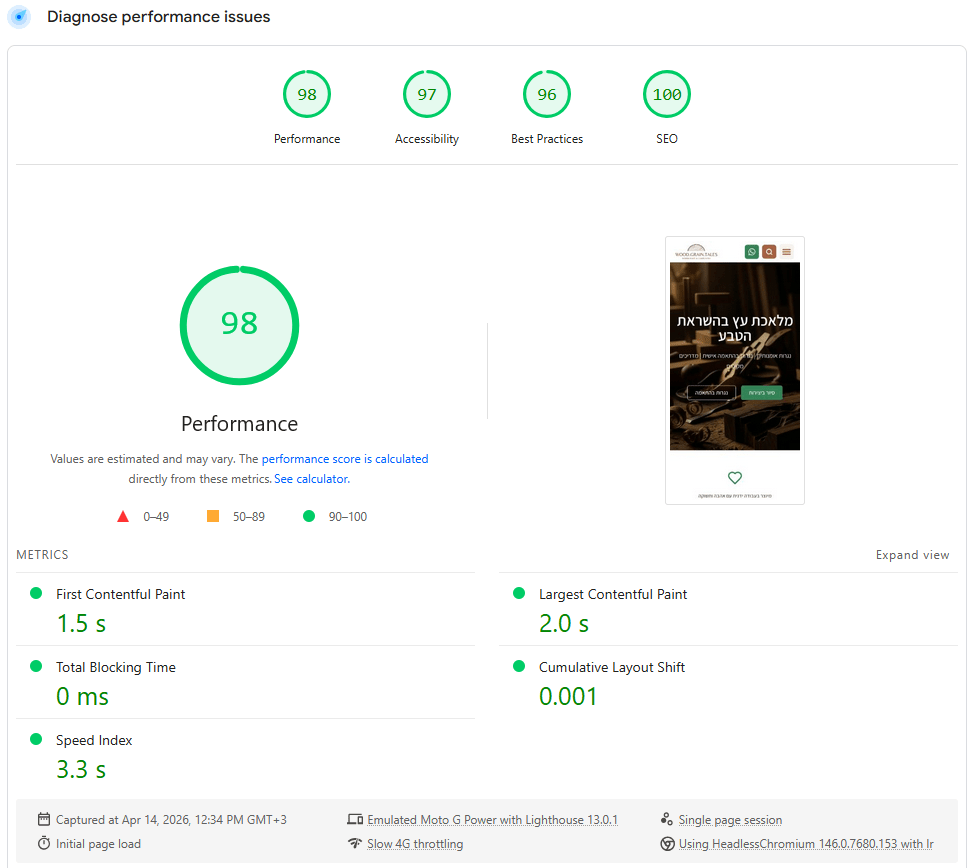
The rebuilt site scores close to 100 on Google PageSpeed Insights for both mobile and desktop. AI site builders and automated conversion services almost never hit those numbers because they ship bloated, generic markup. A real rebuild strips that weight out. Also manual work on speed optimization is always needed to achieve such parameters.
5. SEO Foundations That AI Builders Ignore
Proper title and meta structure, semantic HTML, Schema.org structured data, image alt text, clean URL structure, XML sitemap, and integration with tools like Yoast SEO. The kind of on-page SEO hygiene that AI generators technically “do” but rarely do well enough to rank.
6. Accessibility Compliance
WCAG fundamentals: ARIA roles, proper heading hierarchy, keyboard navigation, handling of slider and gallery components (including hidden clones), and color contrast. Accessibility is one of the first casualties of an AI export because exported components don’t care about semantic correctness.
7. GDPR and Cookie Consent Compliance
Proper cookie consent, privacy policy, and GDPR compliance via a real consent management platform — not a fake banner that does nothing. If you operate anywhere touching the EU or Israel’s Amendment 13, this is not optional.
The result: a WordPress site that looks like the original Lovable design, but behaves like a real business asset. Editable. Fast. Indexable. Accessible. Legally compliant. And not dependent on any proprietary AI platform.
Signs You Need to Rebuild Your AI-Generated Website
You are probably in the AI site-builder trap if any of this sounds familiar:
- You built your site on Lovable.dev, Bolt.new, v0, Framer AI, Webflow AI, Wix ADI, 10Web AI, or a similar tool.
- You can’t change a headline, a paragraph, or an image without re-prompting the AI and hoping nothing else breaks.
- You tried an automated migration service like CloneWebX and ended up with a WordPress site that’s still not really editable — or worse, visually broken.
- You can’t add blog posts, manage SEO properly, or integrate the marketing tools your business actually needs.
- Your PageSpeed scores are poor and you don’t know how to fix them.
- You don’t feel like you own your website anymore.
There is almost never a one-click fix for a site in this state. The underlying issue isn’t the platform — it’s that AI-generated markup was never structured for human editing. What works is rebuilding on a proper foundation (usually WordPress + Elementor, or, better, WordPress with the block editor and a well-built FSE theme, depending on the use case), while keeping the visual direction you liked.
Get Your AI-Generated Website Rebuilt Properly
If you’re stuck in the Lovable → CloneWebX loop, or any variation of it — any AI site builder followed by an automated converter that didn’t deliver — I can help.
I specialize in rescuing AI-generated websites and rebuilding them on WordPress with proper content management, performance, SEO, accessibility, and GDPR compliance. Over 25 years of WordPress and web development experience, working with clients in Israel and internationally.
Get in touch and I’ll take an honest look at what you’ve got, tell you whether it can be salvaged or needs a full rebuild, and give you a realistic plan to get out of the AI site-builder trap.
More articles on WordPress, SEO, performance, and accessibility.
True story! 🙂 And the website turned out great!
Always at your service! 🙂